
DPDP compliance
The register of why you hold each client's personal data, the consents you were given, and the audit trail behind both.
India's data protection law expects you to be able to say, for every piece of personal data you hold about a client, why you hold it and on what legal footing. This screen keeps that record and builds most of it for you as you work.
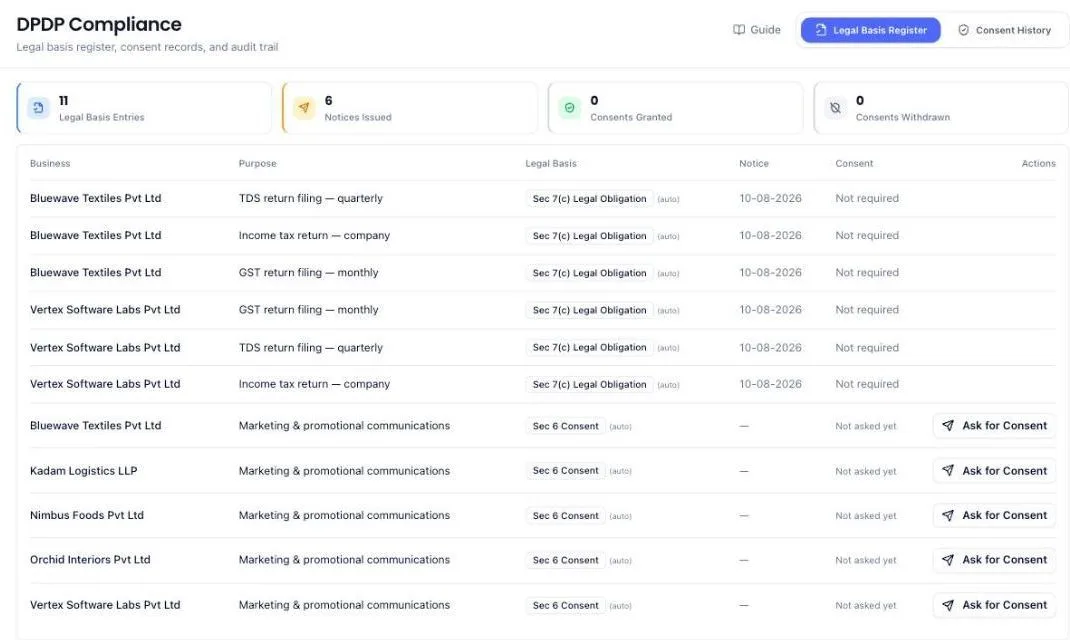
It has two tabs: Legal Basis Register and Consent History.
Before you start
- The module must be enabled for your firm.
- Clients and signed proposals — entries are written from the work you have been engaged to do.
Read the register
Each row is one purpose for one client: what the data is used for, and the legal footing for using it. Four counters sit above it — entries recorded, notices issued, consents granted and consents withdrawn.
Most of your work sits on a legal footing that does not need consent at all: filing a return, running payroll, keeping audit records. Consent is for the things that are genuinely optional — marketing, referrals, publishing a testimonial.
Add an entry by hand
Where you process something the system did not create — a mailing list you keep, records for a purpose outside your engagement — add the entry yourself: the client, the purpose in plain words, and the basis it rests on.
Ask for consent
- Find the entry that needs it. Only the genuinely optional purposes can carry consent.
- Send the consent request to the client contact.
- They confirm on a link, and the record is stored with the time and the device details as evidence.
Consent must be a real choice — the client still gets the service if they decline. That is why these requests are separate from your engagement, and why the tick box on a proposal is optional.
Handle a withdrawal
A client may withdraw consent at any time. Record it, and stop the processing it covered. Withdrawal is shown in the counters and in Consent History, so you can prove when it took effect.
What the system does on its own
- Writes the register from signed proposals. Approving a proposal records the purposes it introduced, dated from the signing.
- Covers new work added later. An approved amendment adds a service, which is a new purpose — the notice travels with the amendment and the entry is dated from when it was sent, not backdated to the original signing.
- Attaches the notice to what the client signs. The client is told what their data will be used for on the same page where they approve.
- Records the evidence — when consent was given, and from where.
What you cannot do (and what to do instead)
- You cannot ask for consent on a purpose that does not need it. Filing a return rests on legal obligation, not permission. The system refuses consent capture on those.
- You cannot make consent a condition of service. The tick box on a proposal is optional and must stay that way — consent required to receive a service is not freely given.
- You cannot send a request to a contact with no email or phone.
- You cannot rewrite history. Withdrawal is recorded alongside the original consent rather than replacing it.
Common questions
Do I have to fill this in?
Most of it fills itself from your signed proposals. Add entries by hand only for processing outside your engagements.
A client asked what data we hold on them.
Filter the register to that client — it lists every purpose recorded, with dates.
What happens if a client withdraws consent for testimonials?
Record the withdrawal and stop using their testimonial. The register keeps both facts, which is what proves you acted on it.
More guides
Every other part of the product, the same way.