
Services and packages
Price your work once, then reuse it on every proposal and invoice — including bundles sold at a package price.
A service is one thing you sell — GST return filing, company incorporation, an annual audit — with a price and a billing arrangement attached. A package is several services sold together for one price. Proposals and invoices are built from this list, so it is worth setting up properly once.
The app offers a walkthrough the first time you open the page.
Before you start
Every service belongs to a category — GST, Income Tax, Audit, or any name you choose. The categories you start with are only a starting set. If the one you need is missing, you can add it in a few seconds without leaving the service; see Add your own category below.
Create a service
- Open Services under Firm in the left menu.
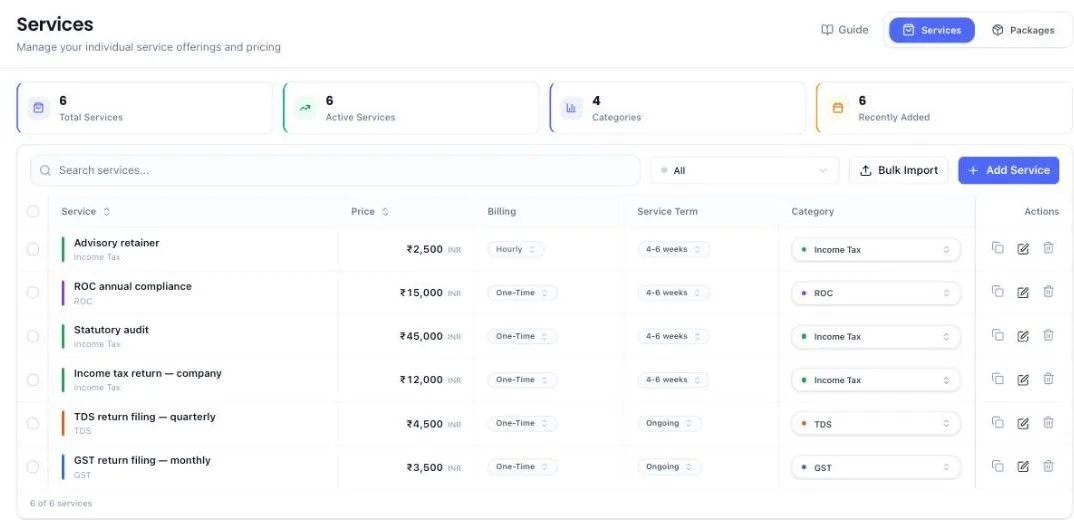
- Click Add Service, top right.
- Start typing the name. After a letter or two a list drops down: services already on your list at the top, each marked already added, and common CA and tax services below them. Picking one fills the name in exactly, so the same work is not sold as “GST Return Filing” on one proposal and “GST returns filing” on the next. Nothing in the list fits? Keep typing your own name — the list only offers, it never blocks. The suggested services carry no price; you set that in the next steps. If the name you choose is unhelpful on a client's invoice, set an invoice name as well — that is what the client sees.
- Pick the category it belongs to. Not listed? Click Create New Category at the bottom of the dropdown, type a name and save. The new category is picked for you, and everything else you filled in stays as it was.
- Choose how it is billed and enter the price:
- Fixed price — one agreed amount for the job.
- Hourly — a rate, billed against time.
- Per user — a rate multiplied by however many users the client has.
- Subscription — a recurring amount on a period you choose.
- Milestone — the job is split into stages, each with its own price.
- Custom — the price is agreed case by case. Use this when the number genuinely varies; you enter it on the proposal.
- List what is included and what is excluded. Both appear on the proposal, and the exclusions are what stop an argument later.
- Check the tax rate, then save. It starts at 18% GST, which covers most professional work. If you have set your own default rate under Invoices, that rate is filled in instead. Change it here for a service on a different slab.
Add your own category
Legal documentation, ROC work, advisory — add whatever your firm actually sells. Every place you pick a category ends with a way to add one:
- While adding or editing a service or package: open the Category dropdown and click Create New Category at the bottom. It is there whether the list has two categories or twenty.
- On the Services list: click a service's category to change it, then New category at the bottom. The service moves to the new category as soon as you save it.
- On a client's page: click Add categories (or Edit) beside the client's category chips, then New category. The category is created and given to that client in one step.
- To see, rename or delete all of them: click Manage categories (or Manage) at the bottom of any of those lists. It opens Compliance → Categories in a new browser tab, so whatever you were filling in is not lost. You can also get there from the left menu: Compliance, then the Categories tab.
- To start from a ready-made set: on the Categories tab, Import Sample Data brings in common CA and tax categories in one go. Pick the ones you want; you can add your own alongside them.
Instead of filing work under a catch-all “Other”, create the category you actually mean. It takes the same effort and keeps the Category column on your services list telling you something.
See which compliance items a service covers
Under each service's name, after its category, the list names the compliance items linked to it — for example GST · GSTR-3B. When more than two are linked, the first two show and the rest are counted: GSTR-1, GSTR-3B +2 more. A service with nothing linked shows its category alone.
- Click a compliance name to open its details — its type, dates and which clients it is assigned to — in a panel on the right. Close the panel, or press your browser's Back button, and you are still on Services.
- Click +2 more (or however many) to see every linked item, then click any one to open it.
- Open the service with the pencil and the Mapped Compliances box at the top of the Details tab lists them all. Change takes you to the Compliances tab, where you tick or untick items.
Create a compliance item without leaving the service
If the compliance item you want to link is not on your list yet, you can create it from inside the service instead of going to the Compliance page and coming back.
- Open the service with the pencil — or start a new one with Add Service — and switch to the Compliances tab.
- Type the name into Search compliances.... When nothing matches, click Create “what you typed”. The Create Compliance button beside the search box does the same at any time.
- The Create Compliance Item form opens with the name you searched for already filled in. If you had narrowed the list to one type, that type is picked for you as well.
- Choose the schedule and due dates, check the reminders, then click Create & Link.
The new item is saved to your compliance list exactly as if you had made it on the Compliance page, so you can link it to other services later. It is also ticked on this service straight away. On a service you are editing, the link saves on its own. On a new service, it is saved with everything else when you click Create Service.
Team members see Create Compliance only if their access lets them create compliance items. Without that they can still tick items that already exist — ask the firm owner to add the missing one, or to widen their access.
Split a service into its usual subtasks
Some services are one job for the client but several pieces for your team. A statutory audit, for example, might always need GST reconciliation, payroll reconciliation and a fixed asset check, each usually done by a different person. Write that list once on the service, and every task for it is split the same way.
- On the Services list, find the service and click the Subtasks column. It reads Add when the service has none, or 3 subtasks once it has some.
- Click Add subtask and type the piece, for example GST reconciliation.
- Beside it, pick who usually does it. Leave it on Main task's person if it goes to whoever has the job.
- Add the rest the same way. The cross at the end of a row removes it.
- Click Save subtasks.
From then on:
- New Task fills them in. Pick the service under Start from a service or compliance and the subtasks appear at the bottom of the form, each with its usual person. Change or remove any before you create the task.
- A signed proposal brings them too. When a client signs a proposal with this service, its task is created with these subtasks already handed out. Each person other than the one holding the job gets their usual WhatsApp and email.
- An existing task can pick them up. Open the task, go to Subtasks, click From a service and pick the service.
- They never reach the invoice. The client is billed for the service. The subtasks only tell your team who does which part. See the Tasks guide for how subtasks work day to day.
Changing the list changes future tasks only. Tasks already created keep the subtasks they were given.
When a service carries no GST
Setting the tax rate to 0% (Exempt) is allowed, and a warning appears under the field saying what it does: invoices for that service show the price with no tax added. It is a warning, not a block — some work genuinely is exempt. Choose it deliberately, not by leaving the field alone.
Worth checking your existing list: a service set to 0% by accident bills every client without GST until someone notices. Open anything that should be taxable and set the correct rate.
Bundle services into a package
- Switch to the Packages tab.
- Click to add a package and name it.
- Pick the services that go in it.
- Enter the package price — the single figure the client pays. It is charged instead of the individual prices, which is what makes a bundle worth offering.
- Save.
See what is inside a package
The Packages tab lists the package name, how many services it holds and the price — not what those services actually are. Click the row, or the eye beside it, to open the full package.
- Every service in the bundle, with its own price and term, and the included and excluded points you wrote on each one.
- What the same services cost bought separately, and how much the package price saves against that — or how much more it charges, if it is priced above the parts.
- The invoice name, if the package shows on the client's bill under a different name.
This view is read-only, so anyone on the team can open it whether or not they are allowed to change prices. On a phone, tap the three dots on the package card and choose View details.
Load your list quickly
Use Bulk Import to bring in a whole price list at once instead of adding services one by one.
The Tax Rate column takes 0, 5, 12, 18 or 28. Leave a cell empty and that row comes in at 18% — so a blank column does not quietly import your whole price list as exempt. Type 0 only where you mean it.
On a phone
The list is not a table on a small screen. Each service is a card: the name first, then the price, then chips for its category, billing and service term. Nothing sideways to scroll.
- Tap the category, billing or service term chip to change it, exactly as you would on a computer. A term that has never been set reads Set term — tap it to choose one.
- The last chip is the service's subtasks — Add, or how many it has. Tap it to open the same list as on a computer.
- Linked compliance items are named under the price. Tap a name to open it, or +N more to see the full list.
- The pencil opens the full service for editing.
- The three dots beside it hold Duplicate and Delete.
- Tick the circle on the left of several cards to delete them together.
- The blue Add button is Add Service, and the upload icon beside it is Bulk Import — both lose their labels at this width.
- Only the Services tab shows at this width — tap More at the top to reach Packages.
Retire a service you no longer sell
Open it and mark it inactive. It disappears from the pickers on new proposals while every proposal and invoice that already used it stays intact.
What the system does on its own
- Prices flow through. Adding a service to a proposal brings its price, tax rate and inclusions across — you can override the price on that proposal without touching the catalogue.
- New services start at 18% GST. Or at your firm's own default rate, if you have set one under Invoices. Duplicating a service keeps whatever rate that service had, including a deliberate 0%.
- Recurring services set up their own billing. A service marked recurring, on a signed proposal, produces invoices on its cycle rather than one-off.
- A service linked to a compliance item prices that work. When that filing is later attached to a client, the system knows what it is worth — compliance items themselves carry no price.
- A service's subtasks follow it onto new work. A task started from the service in New Task, or created from a signed proposal, gets the service's subtasks, each for its usual person.
What you cannot do (and what to do instead)
- You cannot create a service without a category. If none of yours fits, click Create New Category at the bottom of the Category dropdown and make one.
- Changing a price does not change signed proposals. That is deliberate — a signed proposal is what the client agreed to. To charge differently on live work, raise an amendment on the proposal.
- You cannot delete a service that proposals or invoices already use. Mark it inactive instead; the records that reference it must keep working.
- A package price is not a discount calculation. Enter the amount you want to charge — the system does not work it out from the parts. It only reports, on the package view, how your price compares to buying the services separately.
- Changing the default rate does not change services you already have. Nothing on your existing list moves on its own — open each one you want on a different rate.
- A service can hold up to 30 subtasks. If the job has more pieces than that, group the smaller ones under one subtask.
- Subtasks cannot be priced. They are for dividing the work, not the fee. To charge for a piece separately, make it its own service, or split the price with Milestone billing.
Common questions
I only see a few categories. Can I add my own?
Yes. Open the Category dropdown and click Create New Category at the bottom. To see or rename all of them, click Manage categories beside it, or go to Compliance and open the Categories tab.
What does Custom pricing actually do?
It marks the service as having no standard price. The catalogue holds the description and the terms; you type the agreed figure when you put it on a proposal. Use it where every job is priced on scope.
Should the same work be a service or a package?
If a client could buy it on its own, make it a service. Packages exist to sell several of those together at one price.
Should the pieces of a job be subtasks or separate services?
If the client pays for the job as one thing, make the pieces subtasks: the client sees one line on the invoice, and your team sees who does which part. If the client buys and pays for each piece separately, make each one a service.
Why does my invoice show a different name to the service?
Because the service has an invoice name set. That is the field the client sees — change it on the service if it reads wrong.
Why is a service showing no GST on the invoice?
Its tax rate is set to 0%. Open the service, set the rate you want, and future invoices pick it up. Invoices already raised keep the rate they were raised at.
More guides
Every other part of the product, the same way.