
Billing and subscription
Your own plan with PracticeStacks: what it includes, how seats are counted, which add-ons exist, the tax details we print on your invoices, and how to change any of it.
This screen is about what your firm pays PracticeStacks — not what your clients pay you. Client invoicing lives on the Invoices screen. Here you see your plan, your seats, your add-ons, your tax details and your billing history.
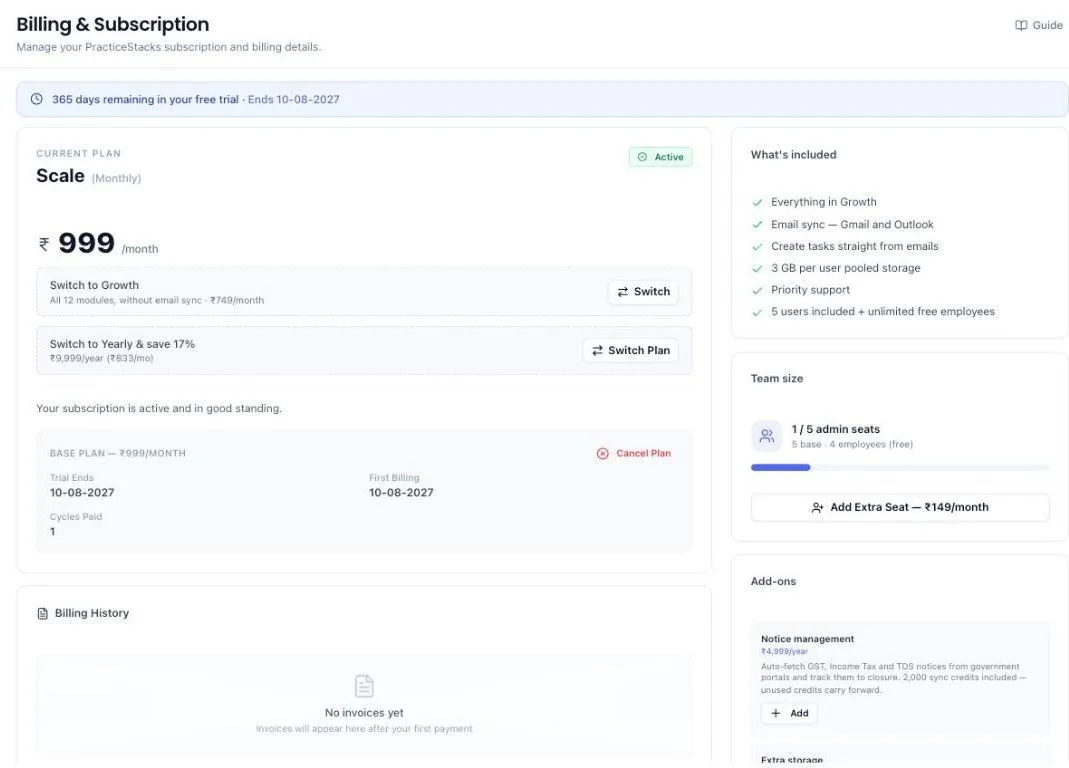
Where to find it
Open Settings and pick the Billing tab. The list down the left jumps you to Plan, Add-ons, Invoices and Tax details & billing contact.
Everything is on that one tab. Older links and the buttons in our payment emails still work — they now open this tab for you.
Before you start
Only the person who owns the firm's account can open this tab. Administrators on your team, even paid ones, will not see it at all. Money decisions belong to one person, so a colleague cannot downgrade the plan or stop the renewal without you knowing.
If you need this tab and cannot see it, the account owner has to make the change, or hand the account over.
Read your plan
The current plan panel shows which plan you are on, what it costs, whether it is monthly or yearly, and when the next payment falls due. On a trial it shows how many days remain and the date it ends.
Two plans are offered:
- Growth — the day-to-day modules: leads, clients, services, proposals, onboarding, compliance, tasks, invoicing and the rest. No mailbox sync.
- Scale — everything in Growth, plus mailbox sync for Gmail and Outlook, creating tasks straight from emails, 10 GB of email storage per user for synced mail, and priority support.
Both plans include 10 GB of document storage for the whole firm. That covers the files on your clients' Documents tabs, onboarding uploads and the files clients send to a compliance checklist. Email attachments, expense receipts and portal notices do not count towards it.
A few things sit outside both plans and are bought separately as add-ons — Notice management is the main one. The plan panel lists exactly what your plan includes.
Yearly billing is offered at a discount against paying monthly. The current prices are shown here and on the public pricing page.
Change plan
- Find the switch panel under your current plan.
- Choose the other plan, or switch between monthly and yearly.
- Confirm. The change is applied to your subscription.
If you pay by UPI auto-pay, your bank will not let the existing mandate be edited, so the payment window opens again and asks you to approve a new one. Approving it does not charge you a second time. Whatever you have already got carries across:
- Still on trial — your remaining free days come with you. The new plan starts when the trial was already due to end.
- Already paid for this month or year — the new plan starts when the period you have paid for runs out. Nothing is taken today.
The confirmation message tells you the exact date of your next charge. If it does not match what you expect, contact support before paying anything further.
If a switch cannot go through, the message names the reason your bank or our payment provider gave, so you know what to do about it rather than reading a generic failure.
A discount you have been given never blocks a plan change. If we cannot apply it to the plan you are moving to, the change still goes through and a message tells you the discount did not come with it. You do not lose it.
Changed your mind halfway through?
Closing that payment window is safe. Your current plan is not touched until the new mandate is approved, so if you close the window, cancel in your UPI app, or the payment simply does not go through, you stay exactly where you were — same plan, same seats, same renewal date, nothing charged. A short message confirms that nothing was charged.
The half-finished switch is not lost either. It appears under your current plan as Plan switch waiting for payment, naming the plan and price you were moving to. Complete Payment opens the same payment window again, and Cancel switch drops it and leaves you on the plan you are on. Starting a different switch from the switch panel replaces it too.
If you did approve the payment in your UPI app before closing the window, nothing is cancelled. The switch finishes on its own once your bank confirms the mandate, and that panel disappears. That is why closing the window is never described to you as a payment received — it is not one, and you should never be told to expect a charge that was not taken.
Your first payment never went through — can you still switch?
Yes. If your plan reads Awaiting Payment and the dashboard is on hold, you do not have to settle the old attempt before picking a different plan. Choose the plan you actually want and the payment window opens for that plan. Approving it starts you on it and retires the one you never paid for.
This is the one case where approving does take a payment on the day. The two rules above carry across what you have already paid for — and on a plan that was never paid for, there is nothing to carry, so the first charge for the new plan is taken when you approve the mandate. Nothing extra is taken for the attempt you did not complete, and closing the window leaves you exactly where you were.
A discount waiting to be activated
If we have given your firm a discount, a green panel appears at the top of your plan saying so — for example 99% off is waiting for you — with an Activate discount button.
It needs a button rather than simply showing a lower price, because a discount cannot be added to an auto-pay mandate that is already running. Your bank fixed the terms when you first approved it. So we start your same plan again with the discount attached, and your bank asks you to approve the new mandate.
- Click Activate discount.
- The payment window opens showing the discounted amount.
- Approve it in your UPI app.
You are not charged twice. The new plan starts when the period you have already paid for runs out, and your old mandate is cancelled only once the new one has been approved. Closing the window is safe, exactly as with a plan switch — you stay on the plan you have, and the panel is still there whenever you come back to it.
If you pay by card, there is usually nothing to do: the discount is applied to the plan you already have and no panel appears.
A grey panel instead of a green one
Sometimes the panel is grey, reads being set up, and has no button. That means we have given your firm the discount but our payment provider has not accepted it yet — almost always something we have to correct at our end.
There is nothing for you to do and nothing to press. You keep paying your normal price in the meantime, you are never charged the wrong amount, and the discount is not lost. Once it is sorted the panel turns green with an Activate discount button, or the lower price simply appears on your plan.
A plan change still works while that panel is showing. Switching plan and collecting a discount are two separate things, so a discount we are still setting up never stops you moving between Growth and Scale, or between monthly and yearly.
Seats — who costs money
Your plan includes a number of administrator seats. The counter shows how many you have used.
- Administrators take a seat each.
- Employees are free and unlimited, however many modules they are granted.
Out of seats, you have two options: add one with Add Extra Seat, or make the person an employee and grant them the modules they need. Most people at a firm do not need administrator rights.
If you have paid for extra seats, they move to the new plan's seat price only once a plan switch actually completes — an abandoned switch leaves your seats billed exactly as they were.
Add-ons
- Notice management — automatic fetching of GST, Income Tax and TDS notices, with a yearly bundle of sync credits. Unused credits carry forward.
- Extra storage — ₹499 a month for each 100 GB, added on top of the 10 GB of document storage every plan includes. The Extra storage card shows how much you have used, for example 7.5 GB of 10 GB used. The bar turns amber at 90% and red when storage is full.
Click Add on either. They attach to your existing plan.
Tax details on your invoices
The Tax details panel is what we print on the tax invoices we send you. It is deliberately separate from your firm profile: your firm profile is what your clients see, and editing it should not quietly change the name on an invoice you have already filed.
Fill in whichever of these you want on the invoice:
- Registered name — the name your firm is registered under, if it differs from the trading name.
- GSTIN — needed to claim input tax credit on what you pay us. Without it the invoice still arrives, but there is no credit to claim.
- PAN.
- Place of supply — the state you are supplied in. Type your GSTIN and this fills itself in, because the first two digits of a GSTIN are the state code. You can change it if you need to.
- Billing address.
Everything here is optional. Leave a box blank and we use your firm profile instead, so a firm that never opens this panel still gets a usable invoice.
Click Save when you are done. Changes apply to invoices issued from now on. Invoices you already have keep the details they were issued with, which is the whole point — a filed invoice must not change under you.
Why does my invoice say CGST and SGST instead of IGST?
Because of your place of supply. If you are supplied in the same state we supply from, the invoice carries CGST and SGST at half the rate each. Anywhere else in India, it carries one IGST line at the full rate. The total is identical either way — but only one of them is a valid tax invoice for you, and the wrong one costs you the credit.
Where billing email goes
The Billing contact panel sets a separate email address for invoices, receipts and payment-failure alerts. Most firms put their accounts person here rather than the partner who owns the login.
Leave it blank and everything goes to your login email.
Before we charge you
Remind me before each charge is on unless you turn it off. Three days before we debit your mandate, you get an email with the amount and the date.
It is on by default for a reason: an auto-pay debit lands in your current account with no warning of its own. If you would rather not be reminded, turn the switch off and it stops.
Your payment method
The Renewal & payment method panel names how you pay — usually a UPI Autopay mandate.
There is no card to update here, and no expiry date to watch. Your bank holds the mandate, not us, and a bank will not let a running mandate be edited or pointed at a different account. To pay from somewhere else, click Change payment method. That approves a fresh mandate on the same plan at the same price — one more payment screen, and nothing extra is charged.
Turn off automatic renewal
Click Turn off in the Renewal panel to stop the next charge. You keep everything until the end of the period you have already paid for, and then the plan stops. Your data is not deleted.
You cannot switch it back on. Your bank will not restart a mandate once it is stopped, so carrying on later means approving a new one — same plan, same price, one more payment screen. The confirmation box says so before you commit.
If renewal is already off, the panel shows the date your plan stops and offers Start renewing again, which does exactly that.
Billing history and invoices
Every payment taken appears in the history list with what it was for, its invoice, its GST breakdown and the date it was emailed to you. It is empty until your first payment.
- Download one invoice — the download arrow beside it.
- Download all — the button in the panel header. You get a single PDF with one invoice per page, which is what your accountant actually wants, rather than a folder of separate files. It takes a few seconds to build.
If we refund you
A refund is arranged with support — there is no refund button on this screen. Once it has actually gone through, two things happen without you asking:
- You get an email at your billing contact address, headed Refund processed, with the amount, the payment it came from, the refund reference, the date, and the invoice it relates to.
- The payment in your billing history gains a line reading Refunded ₹884 · 08-09-2026 under the invoice it belongs to, so the money coming back sits with the money that went out.
The email is only sent once the money is genuinely on its way back. Asking for a refund and the refund actually clearing are two different moments, and you are told about the second one — so a refund that failed at the bank never reaches you as good news. If part of a payment is refunded rather than all of it, the email says so and names both figures.
How long the money takes to appear is your bank's business, not ours. It goes back to whatever you originally paid with, and most banks and card networks take a few working days. Quote the refund reference from the email if you need to chase them.
The original tax invoice is unchanged. It records a payment that really was made, and a refund does not rewrite it.
The email we send when a payment goes through
Every successful payment gets its own email, sent to your billing contact. It opens with the amount taken and what it was for, then lists the date, how you paid, your payment reference, your subscription reference, the period covered and the date of your next charge. The full tax invoice sits inside the same email, with the GST already split the right way for your state.
Three buttons sit above the invoice — Open PracticeStacks, View invoice and Download PDF. Each one signs you in on the way, so you are not asked to log in first or go looking for the screen yourself.
The email names what you actually bought. A plan renewal names the plan and lists what it includes. An extra seat or an add-on says so instead, and does not list plan features that payment did not buy.
Every invoice number is unique and runs in order — PS-2026-27-001, then 002, and so on — restarting each April with the financial year. Quote it if you ever need to ask us about a charge.
If your trial has ended or a payment failed
When your trial runs out, a payment does not go through, or your auto-pay mandate is cancelled at your bank, the rest of the dashboard is covered by a payment screen. That screen has a View billing details link that brings you straight here.
Billing is the one screen that is never covered. You can always open it, read your plan, seats, add-ons and past payments, and pay from there.
The grace period
A failed payment does not lock you out on the day. A red bar appears across the top saying your payment method is no longer active and the date you have to fix it by. Everything keeps working until then. Click Fix payment method and approve the new mandate, and the bar goes.
Let that date pass and the dashboard becomes read-only until payment is set up again. Nothing is deleted at any point. Set up payment and it all comes back exactly as you left it.
An amber bar means something different: your payment has arrived and is being confirmed. That one has no payment button, because there is nothing left for you to pay.
If you close the payment window without paying
Closing the payment window ends the wait. The screen stops checking and reads Payment Incomplete — your payment was cancelled, no payment was made, with a Complete Payment button that opens the same payment window again whenever you are ready. Nothing was charged and nothing was lost.
If you did approve the payment in your UPI app before closing the window, the screen keeps waiting instead. We check with your bank before saying anything was cancelled, so a payment that is still clearing is never described as a failure — and you are never asked to pay for it twice.
What the system does on its own
- Renews on your cycle and takes payment on the date shown.
- Warns you before each charge, by email, unless you turn the reminder off.
- Counts seats live as you add or change administrators.
- Files each payment into billing history with its tax invoice, and emails your billing contact a confirmation of the payment with that invoice inside it.
- Emails you when a refund has actually been processed, and shows it under the payment it came from in billing history. You are told once, when the money is genuinely on its way back — not when the refund was first raised.
- Names what each payment was for — the plan, extra seats, or an add-on — on the invoice, in the email and in billing history.
- Numbers every invoice in one unbroken series for the financial year, so no two invoices can ever share a number.
- Freezes your tax details onto each invoice as it is issued, so an invoice you have filed never changes.
- Splits GST correctly — CGST and SGST, or a single IGST line — from your place of supply.
- Reminds you before a trial ends, by email.
- Tells you when a payment fails, by email and WhatsApp, and shows the date access changes.
- Keeps checking with your bank while a new auto-pay mandate is being registered, and opens the dashboard as soon as it clears.
- Stops checking when you close the payment window without paying, and says your payment was cancelled instead of leaving you watching a spinner.
- Holds your current plan until a plan switch is paid for, and keeps an unpaid switch on this tab so you can finish it or cancel it yourself.
- Names the reason a plan change could not go through, rather than showing a generic error.
- Carries a discount you have been given onto your plan the next time you start or switch one, so it is never lost.
- Never lets a discount block a plan change or a new plan. If our payment provider will not accept the discount, the change goes through anyway and we tell you the discount did not come with it.
- Records every billing change on the Activity tab, with who made it and when.
What you cannot do (and what to do instead)
- You cannot open this tab unless you own the firm's account. Administrators on your team will not see it. Ask the owner.
- You cannot update a card or change a bank account here. Your bank holds the mandate. Use Change payment method, which approves a new one.
- You cannot force a failed payment to retry now. Your bank sets the retry schedule. Approve a new mandate instead — that works immediately.
- You cannot switch automatic renewal back on once you turn it off. Use Start renewing again, which approves a new mandate on the same plan.
- You cannot request a refund from this screen. Write to support with the invoice number. If one is agreed, you are emailed once it has gone through and it appears under that payment in your billing history.
- You cannot change the tax details on an invoice already issued. Save the new details and they appear on the next one.
- You cannot change the number on an invoice. It is allocated when the payment lands and belongs to that payment for good.
- You cannot add seats without an active plan. Start or renew the plan first.
- You cannot change plan on a cancelled or expired subscription. Start a plan again, then switch. A plan that is merely awaiting payment can still be switched.
- You cannot add an add-on before starting a plan. Add-ons attach to a base plan.
- You cannot hold two active subscriptions. Change the one you have.
- You cannot start a second subscription while an earlier payment is still clearing. Wait for it to confirm.
- You cannot lose your current plan by abandoning a switch. It stays until the new one is paid for.
- You cannot have a discount added to a UPI auto-pay mandate that is already running. Use Activate discount on the green panel, which starts the same plan again with the discount on it.
- You cannot activate a discount our payment provider has refused. The panel turns grey and says being set up, and there is no button — it is ours to fix, not yours.
- You cannot upload documents once your firm's storage is full. The upload is refused and the message says how much is used. Add Extra storage here, or delete old files. Only the account owner can add storage — a team member is told to ask you.
- You cannot remove an add-on you never added.
Common questions
Where has the Billing page gone?
Into Settings. Open Settings → Billing. Old links still work and bring you here.
How much document storage do we get?
10 GB for the whole firm on either plan, shared by everyone. Each Extra storage add-on adds 100 GB for ₹499 a month. Billing shows how much you have used. When it is full, new uploads are refused until you add storage or delete old files — nothing already stored is touched.
Do all my staff cost money?
No. Only administrators take a seat. Employees are free and unlimited, and can be granted every module they need to do their job.
My partner is an administrator but cannot see the Billing tab.
That is deliberate. Only the account owner can open it. Administrators run the firm's work; they do not change what the firm spends.
What is the difference between this and the Invoices screen?
This is what you pay us. Invoices is what your clients pay you.
Where do I put my GSTIN so I can claim credit?
Tax details, on this tab. Save it and every invoice issued after that carries it.
Our accounts person never sees the invoices.
Put their address in Billing contact. Invoices, receipts, refund confirmations and payment-failure alerts all go there instead of your login email.
We were refunded and nobody told us.
That has been fixed. A refund now emails your billing contact as soon as it has actually been processed, and shows up under the original payment in Billing history. If you were refunded before this and want it confirmed in writing, send support the invoice number.
My refund email arrived but the money is not in my account.
The email means the refund has left our payment provider, not that your bank has posted it. It goes back to whatever you paid with and usually takes a few working days from there. Quote the refund reference in the email when you ask your bank about it.
What is the PS-2026-27-001 number on my invoice?
It is our invoice number for that payment — our own series, the financial year, and where that invoice sits in the year. They are unique and they run consecutively, which is what GST asks of an invoice series. Quote it when you write to us about a charge.
I paid for extra seats and the email did not list my plan features.
That is deliberate. The confirmation describes what the money actually bought. Seats and add-ons are top-ups on top of your plan, so the email names them rather than listing a plan you did not just pay for.
Did I get charged twice? I have two invoices for the same day.
Check what each one says it was for. A plan renewal and an extra seat are separate payments on separate mandates, so both can land on the same day and each gets its own invoice. If both name the same thing, contact support with the two invoice numbers.
My card is about to expire. Where do I update it?
There is nothing to update. If you pay by UPI Autopay there is no card and no expiry. If your payment does stop working, you get an email and a red bar at the top of the dashboard, and Fix payment method sets it up in one go.
A payment failed. How long do I have?
The red bar says the exact date you have to fix it by. Everything keeps working until then, and nothing is ever deleted.
I paid — why has my subscription not started?
Your bank is still registering the UPI auto-pay mandate. Wait a minute or two; the screen checks by itself and opens as soon as it clears. Do not pay again — if it is still stuck after several minutes, contact support.
I closed the payment window without paying, and the screen kept saying it was confirming my payment.
It no longer does that. Closing the window now stops the checking straight away and tells you your payment was cancelled, with a Complete Payment button to try again. You were not charged. The only time the screen keeps waiting is when your bank tells us a payment really is in flight — which is exactly when you should not pay again.
I closed the plan-switch payment window and was told my payment had been received.
That message was wrong and has been corrected. Closing the window now tells you the plan was not switched and that nothing has been charged, and the unfinished switch is shown under your plan with Complete Payment and Cancel switch. You are only told a payment is being confirmed when one really was made.
My payment did not complete and now I want a different plan.
Switch straight to it. Use the switch panel on this tab to pick the plan you want — the payment window opens for that plan, not the one you did not pay for. You are not asked to settle the old attempt first, and nothing from it is charged. Approving the new mandate takes the first payment for that plan on the day, because there is nothing already paid to carry across.
I started switching plan and closed the payment window. What happened to my plan?
Nothing. You are still on the plan you were on, with the same renewal date, and you were not charged. The switch you started is kept for you under your plan as Plan switch waiting for payment — click Complete Payment to finish it, or Cancel switch to drop it.
We were given a discount, but we are still paying full price.
Look for the green discount panel at the top of your plan and click Activate discount. Until you do, your bank keeps charging the amount you originally approved — the discount only takes effect on a mandate approved after it was given.
If the panel is grey and says being set up instead, the discount has not been accepted by our payment provider yet. That one is ours to fix — you carry on at your normal price and it applies once it is sorted.
I clicked Activate discount and got an error about the offer.
That means our payment provider would not accept the discount on your subscription. Nothing changed on your plan and nothing was charged. The panel turns grey and reads being set up from then on, so you are not left pressing a button that cannot work, and support is told automatically.
My upgrade was refused and the message mentioned an offer.
That has been fixed. A discount we cannot apply no longer stops you changing plan — the switch goes through, and if the discount could not come with it, a message says so at the time.
I am on a trial. If I switch plan now, do I lose my free days?
No. Your remaining days carry over to the new plan, and you are not charged on the day you switch.
Why was ₹5 taken when I started my free trial?
Starting the trial sets up auto-pay for when it ends. Razorpay takes ₹5 once to confirm that auto-pay works, and refunds it automatically within minutes. Nothing else is charged until the trial ends. The screen says this under the Start free trial button.
If you have no free trial left, there is no ₹5 check: the plan price is charged when you approve auto-pay.
Our trial is ending.
Pick a plan on this tab before the end date. Nothing is deleted if you do not, but paid features stop.
Can we pay yearly?
Yes, at a discount against monthly. Use the switch panel under your current plan.
My accountant wants every invoice for the year.
Click Download all in Billing history. One PDF, one invoice per page.
The payment screen blocks everything — how do I check what I actually owe?
Click View billing details on that screen. It opens this tab with your plan, seats and payment history, and a Set up payment button at the top.
More guides
Every other part of the product, the same way.