
PracticeStacks vs CA OMS: Which One Actually Runs Your Firm?
Comparing PracticeStacks and CA OMS? Discover how end-to-end practice management covers lead generation, onboarding, and compliance to scale your firm.

A GST return is overdue. Not because the work was missed. It was never assigned.
The client sent a WhatsApp message three weeks ago about a new engagement. It is still buried in the 'will reply later' pile. At the same time, the firm has already rolled out CA OMS for task management, bulk daybook, and GST billing. Deadlines are tracked. Tasks are assigned with one click.
But the lead is still stuck in WhatsApp. That is because CA OMS is built to organise the work you already have. It is not built to win the client first.
If you are comparing CA practice management software or CA task management software, this is the key issue. The real question is not feature count. It is where your firm needs help: before the client is won, or after.
The real gap
Growing CA, CS, and tax firms often fix one visible pain point at a time.
Missing deadlines? Add a task tool.
Missed reminders? Add billing software.
Scattered documents? Add a portal.
Each tool helps with one slice.
The problem is the handoff between those slices.
An enquiry never becomes a proposal.
A proposal is sent, but no one follows up.
A client signs up, but onboarding stays in a notebook.
The work gets done, but no invoice is raised.
That gap is a visibility problem. A partner often ends up carrying it in their head.
What CA OMS does well
CA OMS is a focused delivery and ops tool. Its strengths are real:
Bulk Daybook: assign recurring compliance work across many clients at once.
GST billing: create GST-compliant invoices and track collections.
Client portal: let clients upload files and check task status.
WhatsApp automation: send reminders and follow-ups as a paid add-on.
Document vault: keep client files in one searchable place.
Team and HR: track attendance, leave, and salary slips.
If your main issue is compliance work, billing, and payroll, CA OMS covers that well.
Where the platforms differ
The main difference is the client journey.
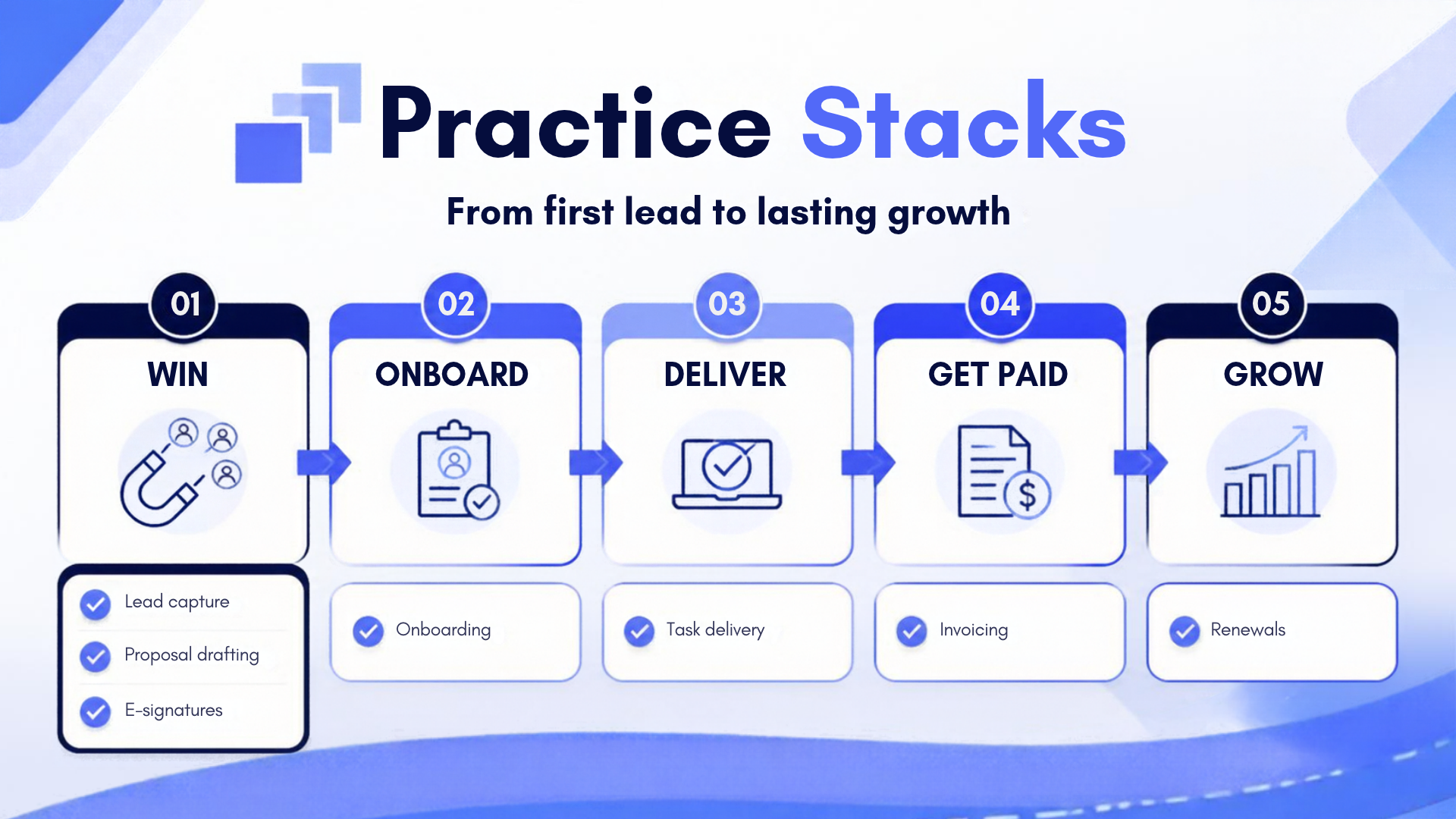
Win → Onboard → Deliver → Get Paid → Grow
CA OMS starts after the client is already in your system. It tracks delivery, billing, and staff HR.
PracticeStacks covers the full journey, including:
lead capture
proposal drafting
e-signatures
onboarding
task delivery
invoicing
renewals
So the difference is not just features. It is coverage.
Why this gap matters as the firm grows
A two-partner firm can sometimes survive on memory and WhatsApp. That stops working as the client base grows.
At around 15 to 30 active clients, these problems get harder:
leads sit untouched
proposal prices vary by partner
onboarding depends on one person
finished work is not billed
A task manager can fix the middle. It cannot fix the front or the back of the process.
What good visibility looks like
Good management visibility is not a bigger dashboard.
It is the ability to answer these questions fast:
Which leads still need follow-up?
Which proposals are still unsigned?
Which clients finished onboarding?
What work is done but not invoiced?
Which clients are due for renewal?
That is why PracticeStacks keeps every stage on one client record.
Where PracticeStacks fits
PracticeStacks is built to keep the whole flow in one place.
Win: capture leads from your site, LinkedIn, or phone calls; turn them into priced proposals.
Onboard: collect KYC and portal details against a checklist.
Deliver: auto-create compliance tasks from the services sold.
Get Paid: flag completed work until it is billed.
Grow: send renewal reminders and show a live firm dashboard.
It is designed for the full lifecycle, not just the delivery stage.
The practical takeaway
If your pain is staff attendance, leave, or salary slips, CA OMS has a real strength there.
If your pain is earlier in the flow - leads going cold, proposals taking too long, onboarding depending on memory, or work not turning into invoices - that is where PracticeStacks is built to help.
So the better question is not which tool has more features.
It is this: where does the friction happen in your firm, before the client exists, or after?
If it is before, a task manager alone will not close the gap.
People looking for CA practice management software or CA task management software usually end up asking that same question. Even searches typed as 'practicestacks vs cagos' point to the same choice.
Want to see the full flow? The live demo is a sample firm you can click through with no signup. You can also start a 14-day free trial with no card required.
FAQ (Frequently Asked Questions)
1. Does CA OMS have lead management or a proposal builder like PracticeStacks?
Based on the published feature list, no. CA OMS starts once the client is already onboarded. It lists task assignment, GST billing, and the client portal, but not lead capture, proposal building, or e-signatures. PracticeStacks covers those stages too.
2. Is WhatsApp automation free on both platforms?
No. CA OMS sells WhatsApp integration as a paid add-on. PracticeStacks includes WhatsApp follow-ups and reminders in every plan.
3. Which one is cheaper?
It depends on plan length and team size. CA OMS includes 2 users per plan, with quarterly, half-yearly, or yearly billing and a one-time setup fee. PracticeStacks' Growth plan is ₹749/month + GST for 5 users, with no separate setup fee. If you are comparing seriously, run both through your actual team size and the add-ons you'd really need, such as CA OMS's WhatsApp and mobile app add-ons, before comparing headline prices.
4. Does CA OMS handle staff attendance and payroll?
Yes. That is one of its strongest points. It includes attendance tracking, leave management, and salary slips in every plan. PracticeStacks does not currently offer payroll or attendance tracking.
5. Which one has AI features?
PracticeStacks does. It offers AI-assisted proposal drafting, engagement letters, and scope and pricing help. CA OMS does not list AI features on its published page.
6. Can I connect either tool to Claude or ChatGPT to query my own firm data?
PracticeStacks has an official MCP server, so you can query live firm data with tools like Claude. CA OMS does not list API or MCP access on its features page.
7. Does CA OMS track compliance deadlines as well as PracticeStacks?
Yes. CA OMS's Bulk Daybook is strong for recurring compliance tasks across many clients. PracticeStacks builds the compliance calendar from the services sold on the signed proposal. Both are good here.
8. Is switching from CA OMS to PracticeStacks difficult?
PracticeStacks says its team handles data migration for clients, compliance calendars, and open tasks during onboarding. Check current migration scope with support before you switch.
9. Does CA OMS offer a free trial like PracticeStacks?
Yes. CA OMS offers a 7-day free trial with full access and no credit card. PracticeStacks offers a 14-day free trial and a 30-day money-back guarantee after signup.
10. Which one should a solo practitioner or tiny firm choose?
If your main need is compliance work and staff attendance for a small team, CA OMS may feel simpler. If you want to win leads, send proposals, manage onboarding, and connect that work to billing, PracticeStacks is built for that.
Ready to See the Difference Yourself?
If your gap sits before onboarding, with leads going cold, proposals stuck in Word, and no clear view before a client signs, try PracticeStacks free for 14 days or call +91 94038 91377 for a walkthrough of the full Win → Onboard → Deliver → Get Paid → Grow flow on your own data.
Written by
Shekhar MaskeContributor at PracticeStacks. Sharing playbooks on practice management, compliance, and firm automation.
Looking to automate your proposals & compliance?
PracticeStacks helps modern practice and tax professionals streamline their entire workflow from start to finish.